A Managed Object Browser is not a consumer-facing technology, yet it quietly underpins some of the most complex enterprise systems in the world. In the first 100 words, the core idea is this: a managed object browser is a diagnostic and inspection interface that allows administrators and developers to view, query, and interact with managed objects inside large software platforms, particularly virtualized and distributed systems. It exposes internal object hierarchies, properties, and methods that are otherwise hidden behind graphical dashboards or APIs.
Originally developed to help engineers troubleshoot and understand complex system states, managed object browsers became indispensable as enterprise software grew more abstract. In environments where a single click in a dashboard triggers dozens of background operations, administrators needed a way to see what the system itself “knows.” The managed object browser answered that need by providing a raw, authoritative view of the system’s internal model.
Today, managed object browsers are most commonly associated with virtualization platforms, infrastructure management tools, and enterprise middleware. They are used to debug automation failures, inspect permissions, validate configurations, and understand relationships between system components. This article explains how managed object browsers work, why they still matter, how they differ from APIs and GUIs, and what risks they introduce if misunderstood or misused. Rather than treating the managed object browser as a niche utility, this examination places it within the broader story of how humans interact with increasingly autonomous software systems.
Origins and Conceptual Background
The concept of managed objects predates modern cloud computing. As early enterprise systems evolved, engineers needed structured ways to represent system components such as servers, services, users, and configurations. These representations became “managed objects,” entities with properties, states, and behaviors controlled by a management framework.
Managed object browsers emerged as introspection tools within these frameworks. Their purpose was not to simplify interaction, but to make it transparent. When higher-level interfaces abstracted complexity, the browser exposed it again for those who needed precision.
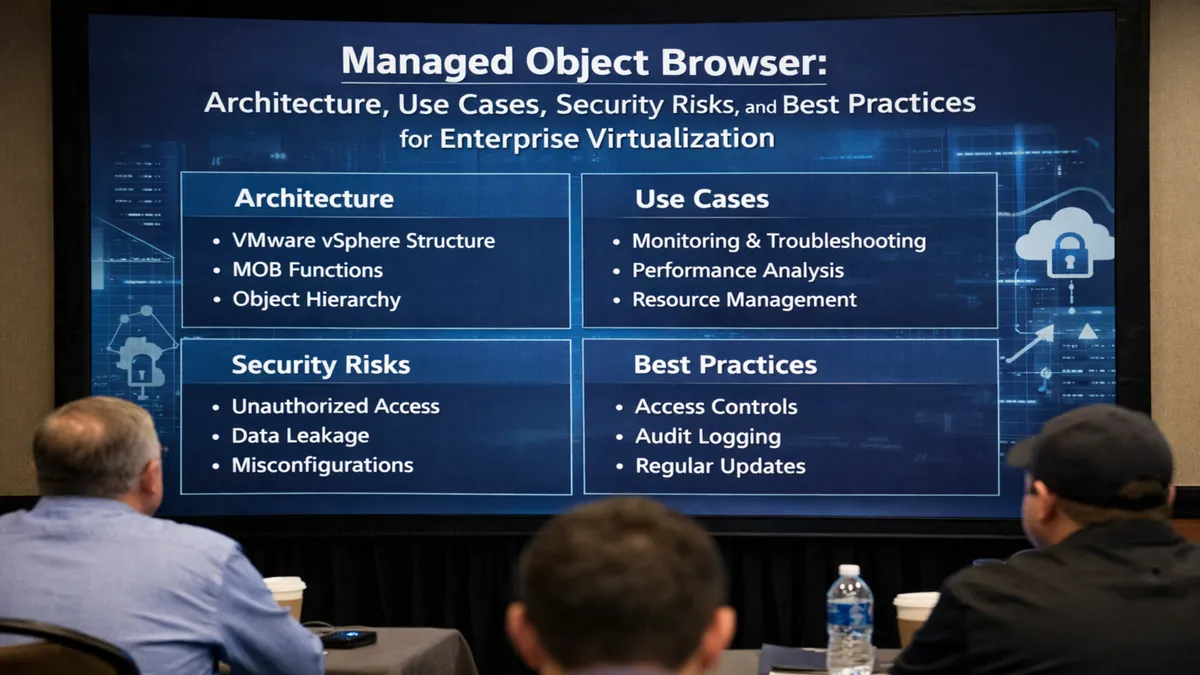
In virtualization platforms and enterprise middleware, managed objects form hierarchical trees. A data center contains clusters, clusters contain hosts, hosts contain virtual machines, and each object exposes attributes and methods. The managed object browser displays this hierarchy exactly as the system understands it, not as a user interface chooses to present it.
This transparency made the tool invaluable for developers building automation and for administrators diagnosing problems that dashboards could not explain.
How a Managed Object Browser Works
At a technical level, a managed object browser connects directly to a system’s management layer. It retrieves object definitions, identifiers, properties, and callable methods from the same backend services used by official APIs.
Rather than executing predefined workflows, the browser allows direct inspection and invocation. An administrator can view a virtual machine’s power state, memory allocation, and runtime statistics, then call a method to refresh, reset, or reconfigure it.
This interaction is typically read-heavy but can be write-capable, depending on permissions. Because it bypasses guardrails present in graphical interfaces, the managed object browser reflects the system’s raw authority.
The browser’s design is intentionally minimal. Lists, identifiers, and data structures replace visual metaphors. For experienced users, this is a feature, not a flaw.
Managed Object Browser vs Traditional Interfaces
| Aspect | Managed Object Browser | Graphical User Interface |
|---|---|---|
| Data Exposure | Complete object model | Curated and filtered |
| Usability | Technical, low-level | User-friendly |
| Error Prevention | Minimal | High |
| Automation Insight | Direct | Limited |
| Risk Level | High if misused | Lower |
This contrast explains why managed object browsers are rarely used for routine tasks. They exist to answer questions that other interfaces cannot.
Core Use Cases in Enterprise Environments
Managed object browsers are most commonly used in troubleshooting scenarios. When automation scripts fail, administrators use the browser to inspect object states and confirm assumptions. If a virtual machine appears healthy in a dashboard but fails to migrate, the browser may reveal locked resources or permission mismatches.
They are also used for learning and development. Engineers studying an unfamiliar platform can explore object hierarchies to understand relationships and dependencies.
Security teams sometimes use managed object browsers to audit permissions and access controls, as the browser reflects effective privileges rather than intended configurations.
In development environments, managed object browsers act as real-time documentation, showing what methods exist and how objects respond to calls.
Managed Objects and APIs
A common misconception is that managed object browsers replace APIs. In reality, they complement them. APIs provide structured, versioned access designed for automation and integration. Managed object browsers expose the same underlying model but without abstraction.
For developers, the browser is often the fastest way to prototype API calls. By observing available methods and parameters, engineers can construct accurate automation scripts.
However, reliance on browser-discovered methods can introduce fragility. Some methods are undocumented or intended for internal use, and future updates may change them without notice.
Security Implications and Risks
Because managed object browsers expose powerful capabilities, they introduce significant risk if improperly secured. Access typically requires administrative credentials, but once authenticated, a user may perform actions that bypass safety checks.
Misconfigurations, accidental method calls, or misunderstood properties can cause outages. In shared environments, unrestricted access can violate separation-of-duties principles.
For this reason, best practices recommend limiting access to managed object browsers, monitoring usage, and using them only in controlled scenarios.
Expert Perspectives
A senior systems architect notes that managed object browsers are “the truth serum of infrastructure platforms,” revealing what the system actually believes about itself.
A cloud automation engineer emphasizes that “every serious automation project eventually touches the managed object model, even if indirectly.”
A security consultant warns that “most incidents involving managed object browsers come from curiosity without caution.”
These perspectives reflect a shared understanding: the tool is powerful precisely because it is unforgiving.
Evolution in Cloud and Virtualization
As cloud platforms matured, some predicted the decline of managed object browsers. Instead, their role shifted. In managed cloud services, browsers are often hidden or restricted, but internally they remain essential for platform engineers.
In private clouds and hybrid environments, they continue to serve as bridges between legacy infrastructure and modern automation layers.
The rise of infrastructure-as-code has not eliminated the need for inspection tools. When declarative states drift from reality, administrators still need a way to see what exists now.
Practical Comparison of Use Scenarios
| Scenario | Managed Object Browser Value |
|---|---|
| Debugging automation failures | High |
| Routine administration | Low |
| Security auditing | Medium to high |
| Learning system internals | High |
| Production changes | High risk |
This table highlights why the browser remains relevant but carefully used.
Operational Best Practices
Experienced teams treat managed object browsers as diagnostic instruments, not operational consoles. Access is logged, usage is documented, and changes are avoided unless necessary.
Many organizations require peer review before browser-based changes, recognizing the lack of built-in safeguards.
Training emphasizes reading before writing, observation before action.
Takeaways
- Managed object browsers expose the raw internal model of enterprise systems
- They are essential for deep troubleshooting and system understanding
- They bypass abstractions present in dashboards and APIs
- Power and risk increase together when using them
- Proper access control and discipline are critical
- They remain relevant despite automation and cloud evolution
Conclusion
The managed object browser occupies a unique place in modern technology. It is neither obsolete nor mainstream, neither beginner-friendly nor optional for experts. Instead, it exists as a truth layer, revealing systems as they actually are rather than how interfaces present them.
In an era defined by abstraction, the managed object browser restores visibility. It reminds engineers that beneath automation pipelines and polished dashboards lie concrete objects, states, and relationships. Used wisely, it accelerates understanding and resolves problems that would otherwise remain opaque. Used carelessly, it can destabilize entire environments.
Its continued relevance speaks to a fundamental reality of complex systems: no matter how advanced interfaces become, there will always be moments when administrators need to look directly at the machinery itself.
FAQs
What is a managed object browser?
It is a diagnostic interface that exposes internal managed objects, properties, and methods within enterprise systems.
Is it safe to use in production?
It can be, but only with caution, proper permissions, and a clear understanding of potential impact.
Does it replace APIs?
No. It complements APIs by exposing the same model without abstraction.
Who typically uses it?
System administrators, platform engineers, automation developers, and security teams.
Why does it still matter today?
Because complex systems still require transparent inspection beyond dashboards and automation tools.
References
- Broadcom Inc. (2025, June 24). Managed Object Browser – TechDocs. Broadcom. Retrieved from https://techdocs.broadcom.com/us/en/vmware-cis/vsphere/vsphere-sdks-tools/7-0/web-services-sdk-programming-guide/managed-object-browser.html Broadcom TechDocs
- Site24x7. (n.d.). Managed Object Browser | Online Help. Site24x7. Retrieved from https://www.site24x7.com/help/vmware/managed-object-browser.html Site24x7
- CIS Security. (n.d.). Ensure Managed Object Browser (MOB) is disabled (VMware ESXi 7.0). Tenable. Retrieved from https://www.tenable.com/audits/items/CIS_VMware_ESXi_7.0_v1.1.0_L1.audit%3A71b85c45a75fecf010e40e70cb945ff3 Tenable®
- ManageEngine. (n.d.). How can I check if the Managed Object Browser (MOB) service is enabled in the ESX host. ManageEngine. Retrieved from https://pitstop.manageengine.com/portal/en/kb/articles/how-can-i-check-if-the-managed-object-browser-mob-service-is-enabled-in-the-esx-host ManageEngine | Community and Support
- Veeam Software. (2014, July 25). Using the vSphere MOB (Managed Object Browser) to Troubleshoot Snapshot Creation. Veeam. Retrieved from https://www.veeam.com/kb1908 Veeam Software